
How to fix the behind-the-scenes stuff that makes or breaks your SEO
Table of Contents
Introduction: Why Technical SEO Still Decides Who Ranks
Here’s the thing: Google doesn’t care how good your content is if your site is a mess. Slow pages, broken links, confusing structure, all of that can bury you on page ten. That’s what technical SEO fixes. It’s not the glamorous side of SEO, but it really is the line between getting found and staying buried.
Picture this: you invite people over for dinner. The food smells great, the table’s set, everyone’s ready to eat… and then the sink backs up and floods the kitchen. Nobody cares about your five-star pasta anymore, they’re too busy watching the mess.
That’s what happens with your site. You could write the best blog post on the internet, but if your pages take forever to load or the links don’t work, people bounce. Google’s the same. It’s walking through your site like a guest, and if it keeps tripping over broken stuff, it’s not coming back. Google’s basically crawling around your pages like a nosy inspector, checking if everything loads fast, if the layout isn’t falling apart, and if its bots can actually get from one page to another without smacking into a dead end. If you don’t sort that out, all the content in the world won’t save you. If you ignore that, you’re basically building a mansion on quicksand.
Site architecture and internal linking that search engines can map
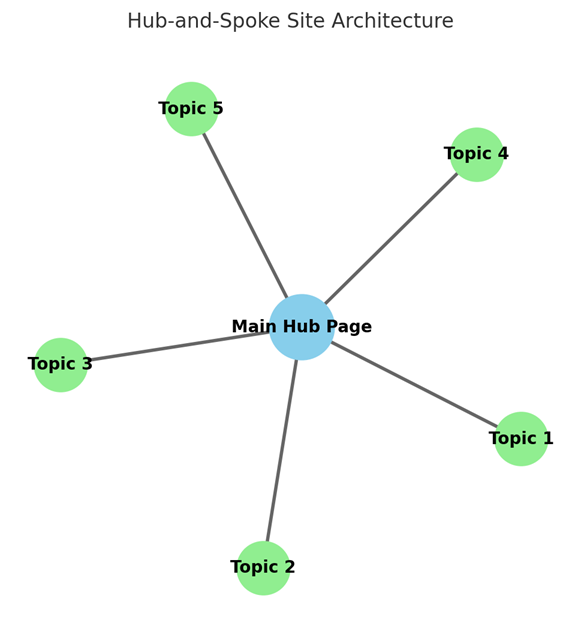
Think of your site like a city. Crawl depth is the number of streets a visitor has to walk before they reach something important. If it takes five turns and two back alleys, most people — and Google — give up. A flat structure, where key pages are just a couple of clicks from the homepage, works way better than a deep maze. That’s where the hub-and-spoke model shines: one main hub page (the hub) connects out to smaller, related ones (the spokes).
Now, watch out for dead ends. Orphan pages — content with no links pointing to them — are like locked rooms nobody can enter. Crawl traps happen too, especially with things like endless calendar links or filters that generate thousands of useless URLs.
The same goes for pagination and faceted navigation. Pagination is just splitting a long list into many pages, like page 1, page 2, page 3 of your product listings. Faceted navigation is when users filter by size, color, or price. Both can easily create hundreds of nearly identical pages. If you’re not careful, Google spends all its time crawling these duplicates instead of your important pages. The fix? Keep your key pages linked, tell Google which version matters with canonicals, and block pointless filter combos.
Crawling and indexing controls you actually need
Search engines don’t magically know what to do with every page on your site. You have to give them rules. That’s where crawling and indexing controls come in.
robots.txt basics – This little text file sits on your server and tells search engines where they can and can’t go. Super handy for blocking useless stuff like admin pages or endless filter URLs. But here’s the catch: people often leave staging sites wide open in robots.txt or accidentally block their entire live site. Always test before publishing changes.
Meta robots and x-robots-tag – These tags are page-level controls. You can set “noindex” if you don’t want a page showing up in Google, or “nofollow” if you don’t want to pass link equity. “Noarchive” just stops Google from storing a cached copy. Use them carefully—don’t blanket noindex half your site.
Canonicals vs 301/302 – Got duplicate pages? A canonical tag tells Google which version is the “main” one. A 301 redirect physically sends visitors (and bots) to the right page. Use canonicals for duplicates that still need to exist, redirects when you want the old page gone for good.
XML sitemaps that stay fresh at scale
Think about ordering food online. If you give the delivery guy the wrong address, he’s going to waste time driving around the block while you sit hungry. That’s what happens when your sitemap is sloppy — Google keeps circling your site, missing the good stuff and crawling junk instead.
Now, here’s the simple truth: an XML sitemap is just a list of pages you want Google to notice. On a small site, one list does the job. But when your site grows, it’s better to split it up-one list for products, one for blogs, one for categories. And don’t forget to update it. If you publish a new post or delete an old one, your sitemap should reflect that. Adding a “last updated” date is like texting Google, “Hey, new content just dropped.”
JavaScript SEO and rendering realities

Here’s the thing about JavaScript: it makes websites fancy, but it can also trip up Google. Imagine walking into a house where the lights only turn on after you clap. People might wait a second, but Google’s bots are impatient. If key content or links only appear after your scripts load, Google might miss them entirely.
That’s why rendering matters. Search engines need to “see” your page just like a visitor does. There are a few ways sites handle this. Server-side rendering means the page is built before anyone (or Google) shows up, so everything’s ready instantly. Static site generation is like having a pre-printed copy of every page waiting at the door. Both make life easier for Google.
If your site runs only on client-side rendering, treat it like a picky eater—you’ve got to double-check what it’s actually swallowing. Googlebot doesn’t always wait around for your fancy scripts to load. Use the URL Inspection tool in Search Console to see the page exactly the way Google sees it. If your main content or links don’t show up there, you’ve basically hidden your best stuff behind a locked door. And if Google can’t see it, it doesn’t exist.
Performance engineering: faster servers and lighter pages

Picture this: you walk into a coffee shop, and the barista just stares at you for ten seconds before saying “next.” That’s what slow servers feel like online. Time to First Byte (TTFB) is basically how fast your site says hello. If that hello drags, people leave. The fix is Faster hosting, caching, and CDNs which are like opening more coffee shops closer to where people live, so the line moves quicker.
Now imagine finally getting your coffee but it comes in a giant bucket instead of a cup. That’s what oversized images and bloated code do to your site. Nobody needs a 5MB photo to see your blog post. Save your images in lighter formats like WebP or AVIF, give phones smaller versions, and only load the code that matters. It’s like packing for a short trip you bring a few essentials, not your whole wardrobe.
And then there’s the extras loyalty card scanners, posters, a survey guy stopping people at the door. Online, those are your third-party scripts: chat boxes, trackers, and pop-ups. Each one slows the line. Keep what matters, toss the rest.
Fast sites feel invisible because they just work. Slow sites feel broken because people never stick around.
Core Web Vitals in 2025: LCP, INP, CLS
Core Web Vitals are basically Google’s way of saying: “Your site might look pretty, but does it actually work for real people without pissing them off?”
In 2025, only three things really matter:
LCP (Largest Contentful Paint): How fast the big, important thing on your page actually shows up. Nobody cares about your spinner; they want the damn content.
INP (Interaction to Next Paint): What happens when someone clicks—does your site jump into action or sit there like a lazy waiter ignoring them?
CLS (Cumulative Layout Shift): Does the layout stay put, or does the text dance around the screen because some ad or image barged in late?
If you nail these three, your site feels smooth. If not, congrats you just built frustration in HTML. Think of it like a waiter in a restaurant—you want the food to arrive quickly (LCP), the waiter to respond when you wave (INP), and your drink not to spill every time they add a plate to the table (CLS).
Google measures this in two ways: “lab data” (simulated tests) and “field data” (real users on real devices). Field data wins. So instead of tweaking every single page, focus on your page templates—like product pages, blog posts, or checkout screens that real users hit the most.
LCP fixes usually mean loading your main content faster: critical CSS inline, prioritizing hero images, and speeding up your server’s first response.
INP and CLS fixes are about smoother interactions: delay non-essential scripts, keep buttons from jumping around, and make sure your page doesn’t re-arrange itself while people are using it.
Mobile-first, security and structured data essentials
Google judges your site by the mobile version first. If it looks broken on a phone, you already lost. Security is next—HTTPS is the basic lock, HSTS keeps it shut tight, and mixed content is just asking for trouble. On top of that, teach Google what your page is about with structured data. Mobile friendly, secure, and marked up—this is the bare minimum for staying visible.
- Responsive foundations, viewport, tap targets, ad and interstitial sanity – Build for fingers, not mice. Big buttons, proper viewport, and ads that don’t hijack the screen.
- HTTPS, HSTS, mixed content and why security signals matter – A safe site earns trust. HTTPS is step one, HSTS locks it down, mixed content ruins it.
- JSON-LD you should ship first: Article, Breadcrumb, FAQ, Product – Give search engines context. Article for posts, Breadcrumb for paths, FAQ for answers, Product for sales.
International and multilingual setups without duplication
If your site targets different countries or languages, Google needs to know which version is for whom. Otherwise, it just sees duplicates.
Hreflang tags act like labels: “This page is for French readers,” “That one’s for English speakers in Canada.” Canonical tags then point to the main version so they don’t compete.
Use simple regional URLs like /us/ or /fr/—clear signs for both people and search engines.
Auditing, monitoring and shipping without regressions
Technical SEO is never done. The moment you relax, something breaks. That’s why you need to keep checking how Google sees your site. Start with Search Console—look at what’s indexed, how often you’re crawled, and whether URLs are behaving. Then peek at your log files to see where Googlebot actually spends its time, and where it’s being wasted. Before launching updates, always run through a simple checklist so old issues don’t sneak back in. Keep tabs on Core Web Vitals with alerts, and use a 90-day plan to stay ahead. Think of it as regular health checkups for your site.
Conclusion and Next Steps
When I first heard about technical SEO, I pictured endless code and server headaches. In reality, it’s closer to looking after a car. If the engine runs smooth, the tires are aligned, and you keep an eye on the dashboard lights, the ride is easy. If you Ignore it, suddenly you’re stuck on the side of the road.
Your site works the same way. Fast pages, clean crawling, and solid Core Web Vitals keep everything moving. You don’t need to fix it all overnight. Start with speed, peek at Search Console, and tidy up obvious issues. Then, little by little, add polish.
Small, steady tune-ups beat one giant overhaul every time.
For More interesting Article, Click Here