
Learn exactly how search engines work, the three pillars of SEO, keyword research, on-page and off-page strategies, technical basics, and common mistakes to avoid—all explained with real examples and simple steps
Table of Contents
Introduction to SEO for Beginners
A while ago, I wrote my first blog post. I spent hours refining every sentence, choosing images, and clicking publish with great excitement. The next morning, I opened my laptop, expecting a surge of readers. Guess what I found? Nothing. Not even my best friend clicked the link I sent. That’s when I realized the internet rewards visibility, not just effort. That’s where SEO comes in.
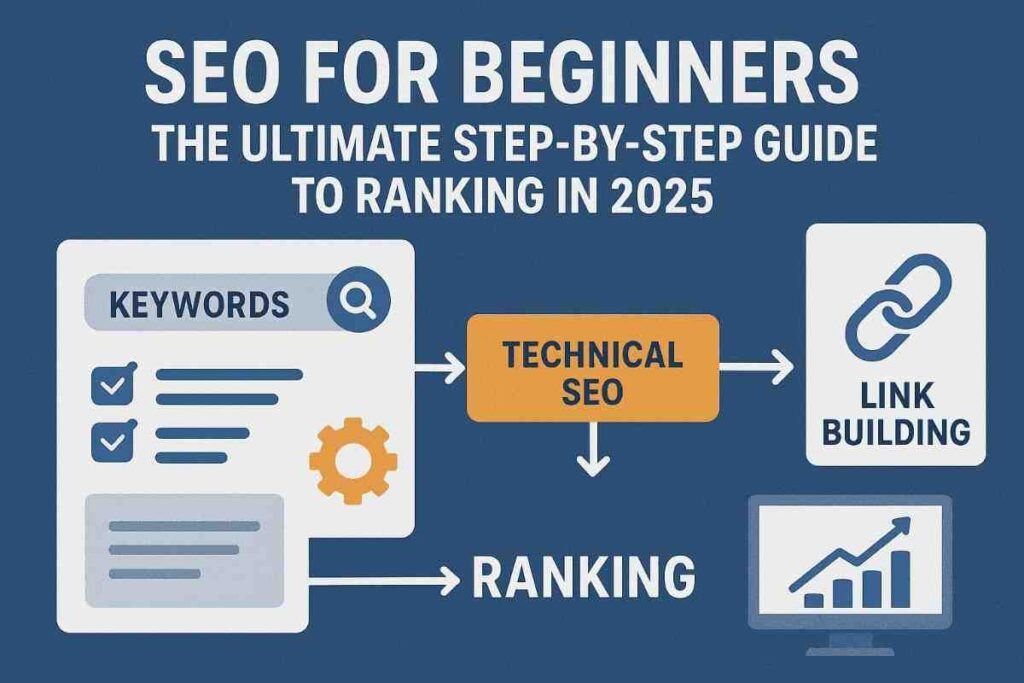
If you’ve ever searched on Google for “best pizza near me” or “how to learn guitar,” you probably didn’t scroll past the first page of results. Most people don’t. We trust the top results. Now imagine your website or blog occupying those top spots. That is the magic of SEO, or Search Engine Optimization. It’s not about tricking the system or deceiving Google. It’s about showing search engines, “Hey, I have the answer people are looking for.”
Here’s the truth: SEO used to scare me, I thought it was a secret code only tech experts could understand. But the more I learned, the more I understood it’s just a set of habits. Write content that matters to people. Organize it in a logical way. Make your website fast and user-friendly. Build trust by getting other sites to mention you. Simple, right?
In 2025, knowing SEO is like being able to read a map in a busy city. You don’t need to remember every street but you just need to know how to reach the right spot. Whether you’re a student creating a personal blog, a small business owner seeking customers, or someone wanting to be heard online, SEO is your way out of internet obscurity.
This guide is for you, the beginner who doesn’t want another dull lecture. I’ll explain SEO using simple language, real examples, and practical steps you can try today. By the end, you won’t just understand SEO; you’ll be prepared to use it.
Why Learn SEO in 2025?
Imagine having a shop on the most popular road in your town. You have shelves full of excellent products, but there is a twist: nobody passing by sees your shop. No sign board, no window display, nothing to make them take notice. That is precisely what you get when you have a website or a blog without SEO. It simply sits and waits, as people walk right past to rivals who understand how to make a notice.
Now jump ahead to 2025. The internet is more crowded than it has ever been. AI content tools are churning out thousands of articles every day, TikTok and Instagram reels are devouring attention spans, and companies are battling more and more just to rank on search engines. If you thought SEO was elective before, now it’s survival. Without it, your content is like whispering in a rock concert stadium. No one hears you.
Here’s the better news: SEO in 2025 isn’t about keyword stuffing or gaming Google. Search engines are smarter now. I learned this the hard way when I published a blog stuffed with keywords like “best digital marketing tips” every second line. At first, I felt clever. Then Google buried it so deep you’d need a shovel to find it. When I rewrote the same article with simple language, better structure, and actually useful advice, it climbed to the first page within weeks. That’s when it clicked: SEO isn’t about tricking algorithms. It’s about being genuinely helpful — and showing it in a way Google understands.
The truth is this: learning SEO today is like learning to swim before the tide comes in. If you’re a freelancer, a small business owner, or a student creating a personal brand, SEO is the skill that gets you noticed. It’s your life jacket in a world that’s drowning in content. And the sooner you learn it, the sooner you’ll rise above.
How Search Engines Work (Crawling, Indexing, Ranking)
When I first started blogging, I thought search engines were magical boxes. You write something, hit publish, and Google just shows it to people. Simple, right? Not so much. I published ten articles before I realized no one was seeing them. Not because my content was bad, but because Google didn’t even know I existed. That’s when I learned about the three steps that control everything: crawling, indexing, and ranking.
Crawling
Imagine a little robot with a flashlight walking through the internet at night. That’s Google’s crawler which goes from page to page, following links, scanning what’s there. If your website is well lit with proper links, the crawler can walk in and explore. If it’s a broken mess, the crawler shrugs and leaves. I once had a blog post buried so deep in a messy navigation menu that Google could never find it. It was like throwing a book into a dark basement and expecting people to read it.
Indexing
Indexing is basically Google deciding where your page belongs in its giant library. When the crawler finds your site, it takes a snapshot and asks, “Okay, what’s this page really about?” If the topic is clear, Google files it neatly under the right category so it can show up when people search.
I learned this the embarrassing way. I once wrote a long article that mixed SEO tips, Instagram tricks, and even a random rant about my college Wi-Fi. To me, it was all “marketing.” But to Google? It was a hot mess. The algorithm didn’t know if my page was about SEO, social media, or my bad internet connection, so it just ignored it. That’s what happens when a page is too scattered—Google literally can’t figure out where to “shelve” it.
The fix was simple but painful: I rewrote the whole thing, focusing only on SEO basics for beginners and this time, the structure was clean, the keywords lined up, with a clear message. A few weeks later, I saw it pop up on the search results. That’s indexing at work and Google finally understood what my page was about and gave it a spot in the library.
Ranking
Now comes the big question: when someone searches, which book gets handed to them first? That’s ranking. Google asks three simple questions namely, is this page relevant, is it trustworthy, and is it easy to use? I remember the day one of my old posts suddenly jumped from page five to page one after I added clear headings and answered questions directly. It wasn’t luck. It was Google finally saying, “This one’s worth recommending.”
So, here’s the truth: search engines aren’t magical at all. They’re librarians trying to serve the right book at the right time. If you want to be chosen, make your website easy to find, easy to understand, and genuinely useful. That’s it.
The 3 Pillars of SEO: An Introduction
When I first heard about “the three pillars of SEO,” it sounded like some sacred mantra whispered in dark marketing forums. In reality, it’s just three areas you need to get right if you want your site to show up: On-Page SEO, Off-Page SEO, and Technical SEO. Think of them like running a café. You need a welcoming shop, good word of mouth, and a solid kitchen that doesn’t collapse.
On-Page SEO
This is everything happening inside your café. Imagine you’re opening the door for a customer. The menu is clear, the tables are clean, the coffee smells great. That’s how your website should feel to both readers and Google. Good titles, headers that make sense, keywords sprinkled in naturally, and content that actually helps. I once spent hours writing a detailed blog but buried the main keyword at the very bottom. Guess what? Google didn’t care how smart I sounded. After I fixed the title, headings, and made the page easier to read, traffic doubled. On-Page SEO is simply making your site worth sticking around for.
Off Page SEO
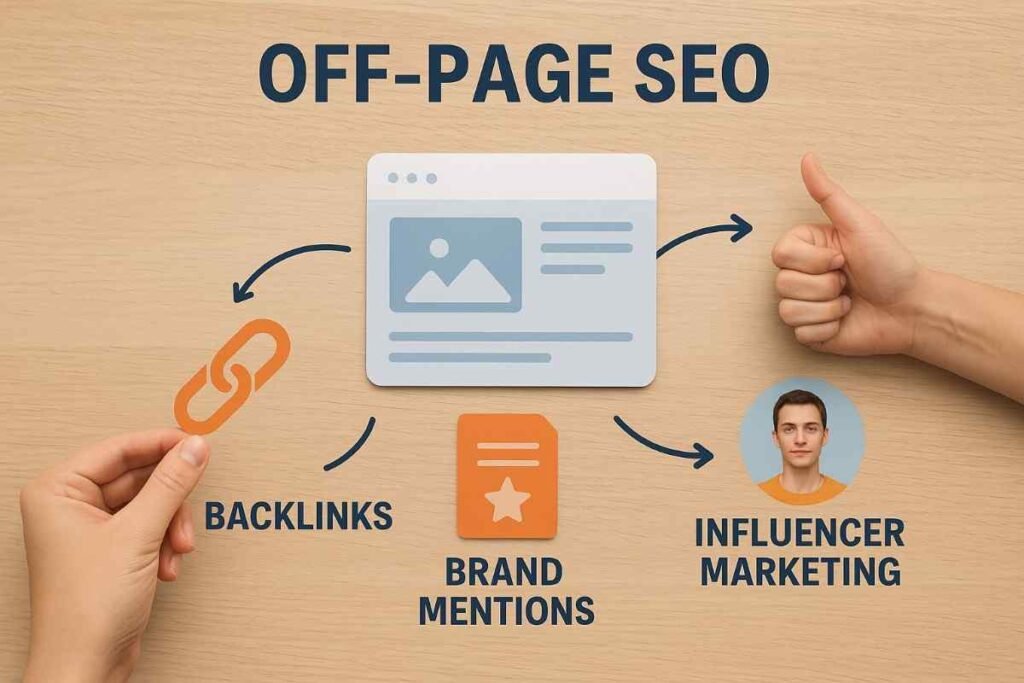
Now imagine your café being talked about in the neighborhood. People recommend it, leave good reviews, and share it with their friends. That buzz is Off-Page SEO. It’s when other websites link back to you, or when people share your stuff online. Early on, I wrote an article that barely got noticed until one popular blogger linked to it in their newsletter. Overnight, my traffic graph looked like a mountain. It wasn’t magic, it was trust. Google saw someone credible pointing to me and thought, “Okay, this site must be worth something.”
Technical SEO
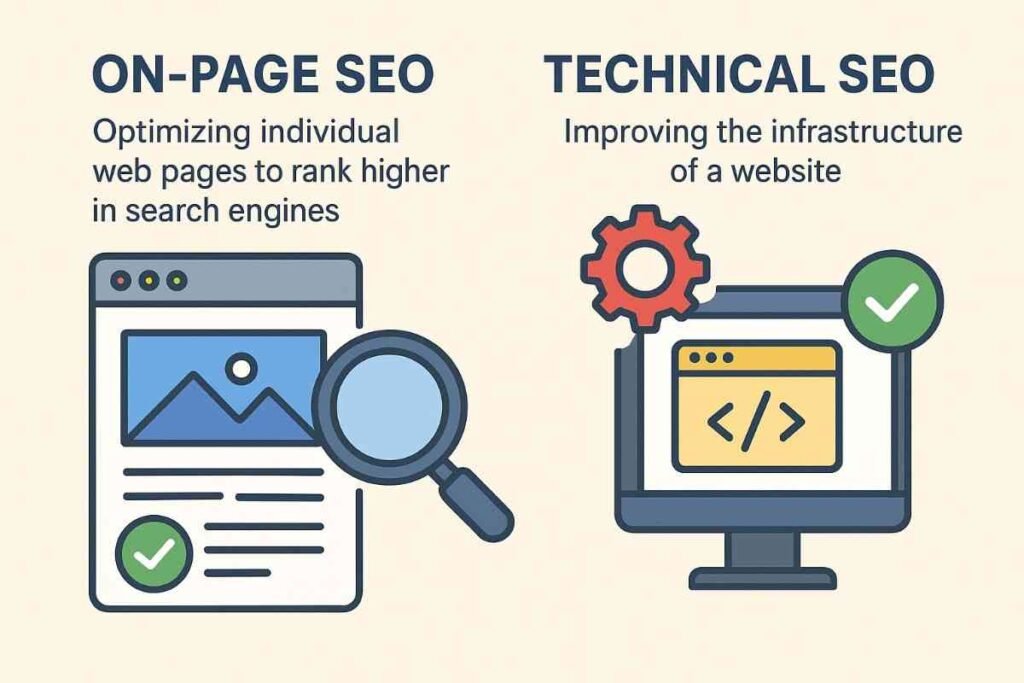
This is the kitchen and plumbing of your café. Customers don’t see it directly, but if it breaks, they’ll notice fast. A slow website is like making people wait 20 minutes for coffee. Broken links are like giving them a menu with missing pages. Google’s crawlers love sites that are fast, secure, and easy to navigate. I once ignored this part because it sounded boring. Then a developer friend fixed my site speed and cleaned up some broken links. Within weeks, my rankings jumped without me changing a single word. That’s the power of Technical SEO.
Together, these three pillars hold up your entire SEO strategy. Neglect one, and the whole thing wobbles. Nail them, and you’ve got a solid foundation that can actually grow with time.
Keyword Research for Beginners
The first time I tried to get traffic to my website; I treated it like writing a diary. I wrote what I wanted, in my words, about topics I thought were “cool.” Then I sat there refreshing Google, wondering why no one cared and that’s when I learned an important truth: it’s not about what you want to say, it’s about what people are searching for. That’s the heart of keyword research.

Think of it like running a food truck. You don’t just pull up in a random street and hope people magically appear. You scout the spots where the crowds hang out, you listen to what they’re craving, and then you show up with exactly that. Keywords are those cravings. If thousands of people are searching “easy SEO tips for small businesses” but you’re writing about “the philosophy of digital optimization,” you’re missing the crowd completely.
Luckily, finding those cravings isn’t rocket science. Start with Google itself. Type in a word like “learn SEO” and see what autocomplete suggests. Those little drop-down phrases are actual searches from real people. Tools like Ubersuggest, AnswerThePublic, and even YouTube’s search bar can show you the same thing — what people are hungry for right now.
Now here’s the trick: don’t always chase the biggest, flashiest keywords. If “SEO” gets millions of searches, you’re competing with giants. Instead, look for long-tail keywords — phrases like “SEO basics for handmade jewelry shops” or “how to learn SEO step by step.” They might get fewer searches, but the people typing them are way more likely to click, read, and stick around.
One of my favorite moments was when a friend of mine who runs a tiny bakery in Jaipur used this trick. She stopped trying to rank for “cakes” (which is impossible) and started writing about “eggless birthday cakes in Jaipur.” Suddenly, she was showing up right in front of the customers she wanted. That’s the magic of keyword research: finding the specific doors your audience is already knocking on, and being there to open it.
On-Page SEO: Optimizing Content & Structure
The first website I ever made was a disaster. I had paragraphs of text crammed together, no headings, blurry images, and I thought I was being clever by stuffing the same keyword everywhere. A friend visited it and said, “I don’t know where to look, so I just closed it.” Harsh, but it was the truth. If your page feels confusing, people leave. And if people leave, Google gets the message and stops sending visitors. On-page SEO is about fixing that. It’s making your content clear, structured, and actually enjoyable so both humans and search engines want to stick around.
The first piece of the puzzle is your content itself. Think of every page you create as answering one big question. If someone lands on your article about “SEO tips for beginners” but halfway through you’re talking about Instagram memes and YouTube hacks, you’ll confuse them. Google feels the same. Clear, focused content wins every time. Start with a single idea and dig deep into it instead of scattering all over the place.
Next comes headings and structure. Have you ever opened a recipe blog that looks like a wall of text? You scroll and scroll, and by the time you find the ingredients list, you’ve already lost patience. Headings fix that. They break down your content into chunks that are easy to skim. H1 is your title, H2s are your main points, and H3s are supporting details. It’s like signposts on a highway — nobody gets lost, and everyone reaches the right exit.
Then there’s the fun part: keywords. People often go overboard here, stuffing their text until it reads like a robot manual. I once saw a blog that repeated “best pizza in Delhi” fifteen times in a 600-word post. It was unreadable. Instead, treat keywords like seasoning. Sprinkle them naturally into titles, meta descriptions, image alt text, and a few times in the body. Enough for Google to notice, but not so much that your readers roll their eyes.
Don’t forget the internal links either. Linking your pages together is like giving Google a map of your house. If you write an article on “keyword research” and link it to “on-page SEO,” you’re helping both your readers and search engines see how everything connects.
Finally, think about the user experience. Pages that load slowly, are hard to read on mobile, or have images all over the place can drive people away in seconds. A good layout, clear fonts, and a clean design are invisible heroes of on-page SEO.
On-page SEO isn’t about tricking the algorithm. It’s about being clear, organized, and genuinely helpful. When readers enjoy your page and Google understands it, you’ve nailed it.
Off-Page SEO: Building Authority
On-page SEO is about fixing up your own website. Off-page SEO is what happens outside your site, as Neil Patel puts it “Off-page SEO (or off-site SEO) concerns everything done off your website to increase your website’s reputation and authority”. This is where things get real. You can have the best content in the world, but if nobody else is talking about it, Google doesn’t care. It’s a bit like school-you could be the smartest kid in class, but if no one knows you, you’re invisible. Off-page SEO is how you get noticed.
For websites, that “vouching” comes in the form of backlinks. These are links from other sites that point to your content. But here’s the thing: not all backlinks are created equal. Ten links from random spammy blogs won’t do much. One link from a trusted site in your industry can move the needle far more. It’s like getting a shoutout from someone respected rather than a bunch of strangers nobody listens to.
When I was freelancing, I wrote a simple guide on SEO basics. At first, it sat quietly on my blog with barely any readers. A few weeks later, a marketing newsletter picked it up and linked to it. Overnight, traffic spiked. That one backlink did more for my site than all the tinkering I had done before. That’s the magic of authority. Google sees that trusted sites are linking to you and thinks, “Alright, this content must be good.”
But backlinks aren’t the only game in town. Your online reputation matters too. Social media shares, guest posts on reputable blogs, even being mentioned in forums or podcasts can signal to Google that you’re not living in a bubble. The more your name and site pops up in trustworthy places, the more the search engines (and people) will take you seriously.
Now, let’s be real: building authority takes time. You can’t just wake up and buy credibility. The trick is to create content people actually want to reference and then put yourself out there. I was nervous pitching my first guest post, but it worked. Sharing small tips on LinkedIn or joining group chats felt awkward at first, yet that’s exactly how people started noticing me.
Off-page SEO is basically the internet’s way of asking, “Why should we trust you?” If your site can answer that question through real connections, mentions, and backlinks, you’ll climb the rankings naturally.
Technical SEO Made Simple
Let’s be honest, the word “technical” in SEO scares a lot of people. It sounds like you need to know coding, servers, or wear a hoodie and sit in front of five screens. But technical SEO isn’t about turning you into a developer. It’s simply making sure your site runs smoothly so Google can actually find and understand it.
One time I had friends over, and everything inside looked great. Snacks, music, the whole deal. But the front door jammed, and they stood outside knocking while I panicked. That’s what a slow or broken website feels like. People want in, but they just give up if it’s too much hassle.
Speed is a big one. I once worked on a site that looked gorgeous but took forever to load. Visitors clicked off before it even opened. A few image compressions and caching tweaks later, the traffic shot up because people actually stuck around.
Then there’s mobile-friendliness. Be honest, most of us scroll on our phones in bed or while waiting in line for coffee. I once opened a site that looked fine on desktop but on my phone it was all over the place — text tiny, images cropped, buttons impossible to tap. I didn’t even bother pinching and zooming, I just closed it. That’s exactly what most people do. Google notices that too, which is why it ranks clean, mobile-friendly sites higher.
Another key part is crawlability. Remember those Google crawlers we talked about earlier? They need clear paths. A messy structure, missing sitemaps, or blocking the wrong pages is like leaving doors locked when the guests are knocking. The crawler gets frustrated and moves on.
And finally, security. If your site doesn’t have that little padlock (HTTPS), it signals “don’t trust me.” I once skipped HTTPS on a side project, and people actually messaged asking if my site was fake. That tiny change from HTTP to HTTPS made my site instantly feel legit, both to users and search engines.
So, technical SEO isn’t about fancy jargon. It’s the behind-the-scenes housekeeping that keeps your site fast, safe, and easy to explore. When you get it right, your content has a real chance to shine because nothing is holding it back.
Free SEO Tools & Resources for Beginners
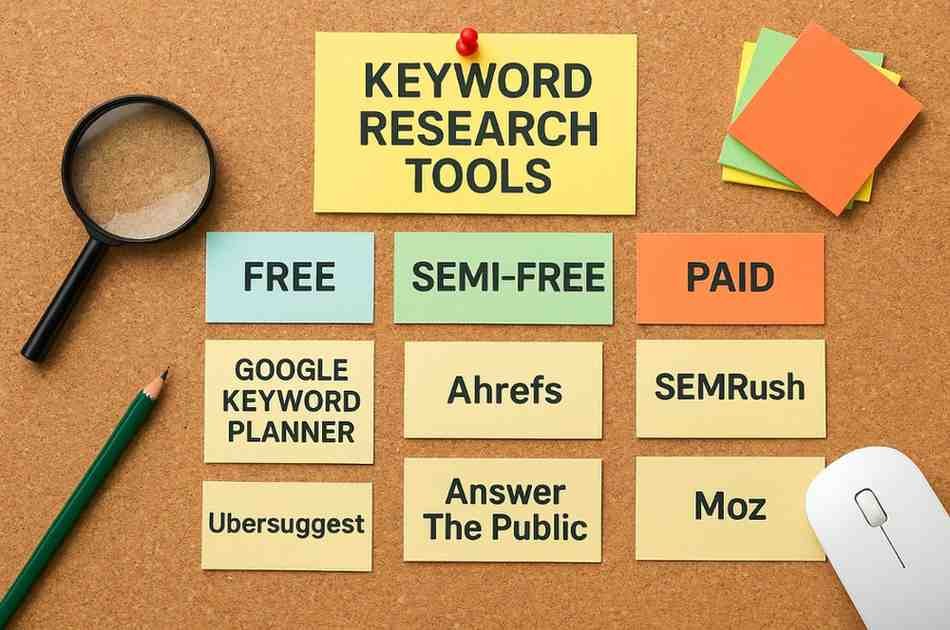
Let’s be real, starting with SEO can feel like you’ve been thrown into a jungle with no map. The good news? There are plenty of free tools out there that act like a flashlight and compass. You don’t need to spend a fortune to get started.
Take Google Keyword Planner, for example. It’s technically made for advertisers, but it’s a gem for beginners who just want to figure out what people are searching for. I remember typing in “healthy snacks” once and realizing there were thousands of searches for “quick snacks after workout.” That tiny insight sparked a whole blog post idea.
Then there’s Ubersuggest by Neil Patel. It’s super beginner-friendly and feels less intimidating than some of the bigger platforms. Type in a keyword, and it throws you a bunch of related ideas along with how competitive they are. It’s like having a brainstorming expert who never runs out of suggestions.
Google Search Console is another lifesaver. It shows you which keywords are already bringing people to your site, what pages are doing well, and where Google might be struggling to crawl. The first time I used it, I was shocked to find that one random post I’d written months ago was bringing in traffic. I doubled down on that topic, and it worked.
And don’t sleep on AnswerThePublic. It’s the tool that gives you real questions people are typing into Google. I once searched for “SEO basics” and it showed me dozens of questions like “Is SEO hard to learn?” and “Can I do SEO myself?” Those turned into perfect blog titles.
Bottom line, free tools won’t magically make you an SEO pro. But they do help you see the path a little clearer. It’s like borrowing a friend’s bike with training wheels. You’re not racing anyone yet, but at least you’re moving forward without crashing every two seconds.
Common SEO Mistakes Beginners Should Avoid
Click here to read comprehensive article on the same
Diving into SEO for the first time feels a lot like trying to fix your car after watching a YouTube video—you think you’ve got it, but then you end up with three extra bolts and no clue where they go. Every SEO pro you admire has been in the same spot. The key here is not perfection, it’s knowing what not to do. So, here are the mistakes beginner keep making (and how to avoid them).
1. Skipping Keyword Research
Imagine opening a coffee shop and telling people you sell “hot bean juice.” Technically correct, but no one’s Googling that. Keywords are how people find you. If you just guess, you’ll waste time writing for phrases no one types.
Use free tools like Google Keyword Planner or Ubersuggest. Even typing your topic into Google and scrolling down to “related searches” beats guessing.
2. Stuffing Keywords Everywhere
Back in 2006, you could rank a page by writing “best pizza New York” a hundred times in Comic Sans. Not anymore. These days, if your content reads like a broken record, Google ignores it and readers click away.
Rule of thumb- if it sounds normal when you read it out loud, you’re good. If your friends laugh when you read it, dial it back.
3. Forgetting Meta Titles and Descriptions
Think of titles and descriptions as the signs outside your store. If you just hang a piece of cardboard that says “Shop,” no one’s walking in. But if your sign says “Fresh Coffee & Free WiFi,” you’ll get a line at the door.
Spend an extra 5 minutes writing titles people want to click. Pretend you’re competing with BuzzFeed.
4. Ignoring Mobile Users
Pull up your site on your phone for a second. Be honest. Does it look smooth, or do you have to pinch and zoom like it’s the early days of the internet? Most people are visiting on mobile now, so if your site is a pain to use, they’ll leave before you even get a chance to show them what you offer.
Responsive design isn’t a fancy add-on anymore. It’s the standard. Just pick a template or theme that adjusts itself for different screens. Your readers will thank you, and so will their thumbs.
5. Flying Blind Without Analytics
Imagine trying to get fit but never stepping on a scale or tracking your workouts. You’d have no clue if you’re actually improving. That’s what skipping analytics looks like in SEO.
Install Google Analytics and Search Console. They’ll show you which posts are killing it and which are just digital tumbleweeds. Then double down on what’s working.
Wrapping It Up
SEO isn’t a sprint; it’s more like slowly getting fit. One workout doesn’t change much, but six months of consistent effort? Big difference. Avoid these rookie mistakes, keep tweaking, and don’t beat yourself up when you trip. Even the SEO gurus started out Googling “what is meta description?”
SEO FAQs (Beginner Questions)
1. How long before SEO works?
Honestly, not overnight. Think of it like going to the gym. You don’t see abs after two sit-ups. With SEO, you might notice little changes in a few months, but real results usually show up after steady effort for half a year or so.
2. Do I actually need keywords?
Yep, but don’t let the word scare you. It’s just “what people type into Google.” If you own a pizza place, your customer is typing “best pizza near me,” not “Italian culinary establishment.” Just use the words people actually use.
3. Why not just pay for ads?
You can, but ads stop the second you stop paying. SEO is slower, but it sticks around. It’s like renting vs. owning a house. Rent’s gone once you stop paying. Buy the place, and it’s yours.
4. Is SEO too technical for me?
Not really. The basics are simple: write stuff people want to read, make sure your site doesn’t look broken on a phone, and check your analytics once in a while. Everyone starts clueless—I once Googled “what’s a meta tag” before writing my first post.
Conclusion and Next Steps
Here’s the honest truth: SEO is a bit of a grind. When I started, I thought I’d publish one blog post and watch the traffic roll in. Instead, the only visitor was my mom (and I’m pretty sure she just felt sorry for me).
That’s the part no one tells you. In the beginning, progress is invisible. But every little thing you fix today—cleaner titles, better keywords, a site that doesn’t look broken on a phone—adds up quietly in the background. Then one day you check your analytics and realize people you’ve never met are actually finding you. That moment feels pretty good.
So what should you do right now? Don’t overthink it. Pick one thing. Update a headline so it’s sharper. Add a proper meta description. Or finally set up Google Search Console so you can track what’s happening. Small steps are how the big wins happen.
And if you feel like you’re fumbling? Welcome to the club. Every SEO “expert” you admire started out fumbling too. The difference is they stuck with it. So keep at it—you’ll be surprised where you are a few months from now.